[컴] React server component(RSC)

리액트 서버 콤포넌트 / reactjs

React server component(RSC)

ref. 1 에서 이야기하는 server rendering 의 장점:

  • 브라우저에서 여러번 서버로 요청하는 것보다는 서버에서 여러번 요청하는 것이 빠르다.
  • me: 물론 브라우저에서 한번 요청할때 모든 정보를 브라우저로 전달해 준다면 그건 이점이 없을 것이다. 하지만 흔히 api server라 불리는 서버라면, 기능별로 쪼개져 있어서 그러기 쉽지 않다.
  • 브라우저에서 동작해야 하는 기능은 관련 library(js file)을 download 해야 한다. 그에 비해 서버는 한번 설치해놓고 계속 사용할 수 있다.

RSC에 대한 몇가지 내용:

  1. 기본적으로 RSC 는 server component 가 root element 가 된다. 그래서 server에서 시작해서 필요한 element 들을 모두 만들고, client component 에 대해서만 client component 라고 표시하고 던져준다고 보면 된다.
  2. client component 는 server component 를 import 할 수 없다. server component 에는 browser에서 실행불가능한 코드도 있을 수 있기 때문이다.

예시

.server.tsx, .client.tsx

react programming 을 할 때 이 component 의 구분은 확장자(extension)으로 해준다. 예를 들어

MyComponent.client.tsx 라면, client component 이며, MyComponent.server.tsx 라면, 이것은 server component 이다.

client component 에서 server component 를 어떻게 사용할 수 있지?

Composite 을 한다. 즉, client component 는 props 로 Server Component를 받는 것이다. 예를 들면, client component 를 만들고, children 을 props 로 받는다고 하면, 이 children 에 server component를 pass 할 수 있다.

RSC 렌더링(rendering)

참고: ref.1, ref. 2

  1. 서버가 브라우저로부터 React component 를 render 해달라는 요청을 받는다.

  2. root component 는 항상 Server component 다.

  3. root component 에서부터 render를 시작해서 하위의 다른 server component, client component들을 render하게 된다. client 의 하위에 있는 server component 도 다 render된다.

  4. 이 때 client component 는 서버쪽에서 render 할 수 없기에, client component 라는 표시만 남겨둔다. (module reference object)

  5. 이것을 client 로 보낸다. 이 때 json 형식으로 된 결과를 보낸다.

    • The RSC Wire Format 예시[ref. 1] :
    M1:{"id":"./src/ClientComponent.client.js","chunks":["client1"],"name":""}
    J0:["$","@1",null,{"children":["$","span",null,{"children":"Hello from server land"}]}]
  6. client 에서 Client Component 와 Server component들의 render된 결과안의 slot들을 render하고, merge 한다.

기존의 SSR 과의 차이

결과적으로 차이점은

  • client 로 보내는 것이 html code 가 아니 json 으로 된 tree 이다.

뿐이라고 생각된다.

server component 를 기존의 servlet 같은 server side rendering(SSR)을 바탕으로 설명해보자.

기존의 SSR

기존의 server servlet page 같은 것들로 비교해서 설명할 수 있을 듯 하다. .jsp 같은 서블릿 페이지들은 다음과 같은 동작을 한다.

  1. 브라우저에서 특정 page를 요청
  2. 서버는 url 에 해당하는 servlet 페이지를 rendering 해서 html page 를 만들어 보내준다.
    • 이때 이 page안에는 javascript code 가 들어가 있다.
    • servlet을 rendering 할 때 servlet 내의 server 관련 함수들은 미리 호출이 돼서 페이지에 반영된다.
  3. 브라우저가 받은 html page 중에 javascript 부분이 브라우저에 의해 실행된다.

React server component

  1. 브라우저에서 특정 page를 요청
  2. 서버는 url 에 해당하는 react component 를 rendering 하고, html page 를 만들어 보내준다.
    • 이때 이 page안에는 javascript code 가 없다.
    • 대신에 json 으로 된, element 를 만드는데 필요한 정보들이 있다.
    • rendering 할 때 server 관련 함수들은 미리 호출이 돼서 response에 반영된다.
  3. 브라우저가 받은 json 를 가지고, client 에서 react component 를 다시 구성하고 rendering한다. 그리고 화면에 보여진다.

왜 써야 하는가?

굳이 이것을 써야 하는가에 대한 고민은 생긴다. 이전의 servlet 을 쓰는 것이 더 나은 것은 아닐까 생각된다.

see also. 1 을 보면, 관련 이야기가 있다. 한번 쯤 읽어보면 좋을 듯 싶다.

See Also

  1. Is React Having An Angular.js Moment?

Reference

  1. How React server components work: an in-depth guide
  2. Composing Client and Server Components | Next.js

[컴] windows batch file 을 테스트할 때 caching

배치파일 캐싱 / 캐슁 / 왜 캐시가 / 왜 수정이 안돼

windows batch file 을 테스트할 때 caching

ref.1 에도 있지만, 경험상, 현재 directory 에 있는 .bat file 을 실행할 때는 caching 된 file을 이용하지 않는듯 하다.

다만, 현재 directory 에 있더라도 full path 로 .bat file 을 실행한다면, caching 된 file 이 실행된다.

"_act - copy.bat" vs _act - copy.bat

또한 windows terminal 을 사용하는데, windows terminal 에서 "_act - copy.bat" 라는 이름의 batch file 을 실행한다고 하면 그냥 _act - copy.bat 이라고 실행하는 경우에 caching 된 batch file 을 실행한다. 그리고 "_act - copy.bat" 를 이용하는 경우라면, local file 을 실행하게 된다.

Reference

  1. windows - Batch-file seems to be cached - Stack Overflow

[컴][머신러닝] gpt4all 사용

local pc / machine learning / 생성형 ai / 챗gpt 로컬에서 사용 / 로컬 gpt / 로컬 chatgpt / chatgpt

gpt4all 사용

환경

  • windows10
  • ram 16GB
  • intel(R) core i5-9400F CPU@2.90GHz

GPT4All

  • Nomic AI 에서 만들었다.
  • 이 프로그램은 LLM 을 이용해서 chat 을 할 수 있도록 해주는 client 이다. 그래서 LLM 을 가지고 있진 않다. 설치후 다운로드 받아서 사용하도록 되어 있다.
  • https://github.com/nomic-ai/gpt4all : 이 applicaiton 을 직접 build 도 할 수 있다.
  • local cpu 에서 돌아가도록 되어있다. 그래서 CPU는 AVX 또는 AVX2 instruction 을 지원해야 한다. 대략 2011년 3Q 이후에 나온 cpu 면 다 지원되는듯(참고: https://en.wikipedia.org/wiki/Advanced_Vector_Extensions)

사용해보기

설치 파일(gpt4all-installer-win64.exe)을 받고 실행하면 된다. (여기로 가면 된다.)

설치하고 설치된 folder에 가서 다음 exe를 실행하면 된다.

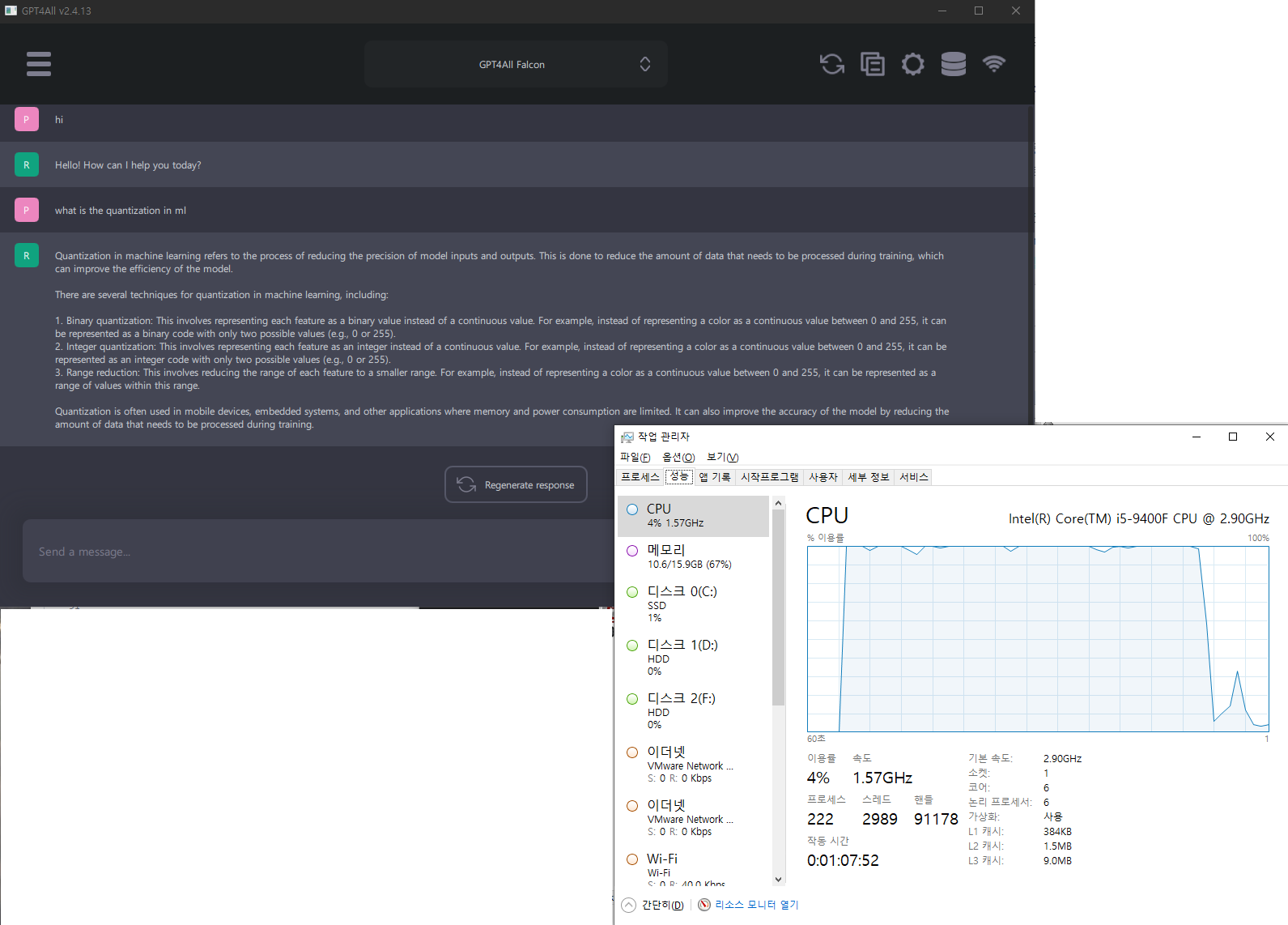
  • d:\a\apps\gpt4all\bin\chat.exe 을 실행하면 아래창이 뜬다.

모델을 선택하라는 화면, download 하길 모델을 선택한다. 그림에도 있지만, Wizard v1.1 의 경우 최소 16GB 이상의 RAM 이 필요하다고 나온다. 여기서는 좀 더 가벼운 GPT4All Falcon 을 택한다.

모델선택 화면
model 을 선택안할때

GPT4All Falcon

  • download size : 3.78GB
  • RAM required : 8GB
  • parameters : 70억개
  • Quantization: q4_0

cpu 사용률은 확실히 높다. 거의 100%를 다 사용한다. gpu 로 돌릴 수 있는 쪽이 사용하긴 더 좋을 듯 하다. 어느수준까지 질문을 해야할지는 모르겠지만 답변은 나쁘지 않아보인다. local에서 chatgpt 같은 수준의 LLM 을 돌릴려면 충분할 듯 싶기도 하다. 앞단에 서버만 하나 만들어주면, local chatGPT 도 가능할 듯.

대화, cpu사용률

Reference

  1. GitHub - nomic-ai/gpt4all: gpt4all: an ecosystem of open-source chatbots trained on a massive collections of clean assistant data including code, stories and dialogue

[컴] netflix 의 Marken

넷플릭스 / 주석 시스템 / 레이블링 / 어떻게 화면을 찾나 / 대용량 대규모 처리 / 하둡 / 카산드라 / 일레스틱서치

netflix 의 Marken

ref. 1, ref.2 를 보면, 넷플릭스는 Marken 이란 이름의 시스템으로 화면에 대한 metadata 를 저장하고 있다.

metadata를 annotation 이란 이름으로 만들었는데, 이 annotation 으로 넷플릭스의 영상 프레임에서 원하는 화면에 원하는 정보를 저장해 놓을 수 있다. 간단히 이야기하면, 화면에 대한 tagging, labeling 같은 것으로 보면 될 듯 하다.

예를 들면, 어느 영화의 어느 시간은 폭력적이다. 어떤 장면은 선정적이다. 어느 장면에는 장갑을 낀 사람이 있다. 등등.

architecture

  • DSL(definition schema language)은 json 을 사용했다. 이 schema 도 버전별로 저장해 놓는다.
  • annotation 을 표현하는 것도 json 으로 했다.
  • db는 casandra 를 사용했다.
  • 다양한 검색을 위해서 elasticseach 도 이용한다.
  • search latency 를 낮은 상태로 유지하려고 노력했다.
from 1.

확장성의 고려

  • 계속해서 annotation data 가 만들어지고, annotation 을 뽑아내는 알고리즘이 변경될 때마다 다시 새롭게 annotatino 들이 만들어진다. 그래서 계속 확장되는 것을 고려한다.
  • 이런 작업은 search 에 영향을 주기에 다른 stack 을 가지고 작업한다.
  • 알고리즘이 향상되면, 좀 더 많은 annotation 을 만들어내는데, 그렇게 되면, 기존의 annotation 을 update 해야 한다. 그것과 관련된 이야기를 ref. 2 에서 해준다.
    • annotation 의 양이 많기에, 그리고 어떤 것을 update할지에 대한 추적도 비용이 크기에
    • casandra/elasticsearch 위에서, data pipeline 작업을 사용자가 뒷단에서의 일을 신경쓰지 않고, 잘 수행할 수 있게 해준다.
    • 그래서 사용자가 annotation 검색을 할 때, 알고리즘에 의해 annotation 이 생성이 완료됐다면, 결과를 넘겨준다. 완료되지 않았다면 아무것도 return 하지 않는다. 그리고 새로운 알고리즘2가 실행된다면, 그동안은 기존의 annotation 의 결과를 넘겨준다. 그리고 알고리즘2의 수행이 끝나면 그때부터 update된 알고리즘을 return 해준다.
    • 이것과 관련된 flag 들은 Cassandra, Elasticsearch 에 들어가 있다. 그리고 api를 통해서 사용자도 알 수 있다.

Reference

  1. Scalable Annotation Service — Marken | Netflix TechBlog
  2. Data ingestion pipeline with Operation Management (Marken) | Netflix TechBlog

[컴][머신러닝] LLM 관련 참고 링크들 from 구글내부 문서, 오픈소스 AI가 유리한 이유


구글내부 문서, 오픈소스 AI가 유리한 이유

LLM 관련 참고 링크들 from 구글내부 문서, 오픈소스 AI가 유리한 이유

대략적으로 이야기하면, 오픈소스 AI 가 여러 다양한 시도를 빠르게 하고, 다른 사람의 작업이 누적되기에 더 나은 결과를 빠르게 가져올 것이라 한다. 자세한 내용은 ref. 1을 보자.

여기서는 ref. 1에 나온 링크들을 정리했다.

링크

Reference

  1. Google “We Have No Moat, And Neither Does OpenAI”

[컴] python Ray library

python Ray library

actor model 을 쉽게 만들 수 있게 해주는 library, actor model 에 대해서는 see also 1. 을 참고하자.

pip install -U ray
import ray

ray.init()


# Define the square task.
@ray.remote
def square(x):
    return x * x

# Launch four parallel square tasks.
futures = [square.remote(i) for i in range(4)]

# Retrieve results.
print(ray.get(futures))
# -> [0, 1, 4, 9]

흐름

작성중…

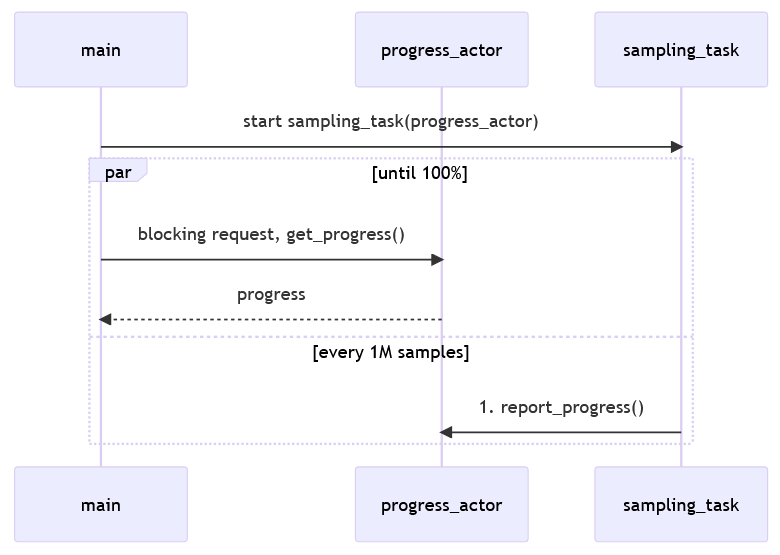
ProgressAction 를 만들고, 일단 samling_task 를 remote 로 실행한다.(아마 다른 thread 에서 실행하는 듯)

ray.get()을 이용해서 progress_actor.get_progress remote로 실행한다. ray.get()는 block 을 시켜준다. 그리고 time.sleep 을 하게 되면,

seq. diagram
import ray
import math
import time
import random

ray.init()


# # Define the square task.
# @ray.remote
# def square(x):
#     return x * x

# # Launch four parallel square tasks.
# futures = [square.remote(i) for i in range(4)]

# # Retrieve results.
# print(ray.get(futures))
# # -> [0, 1, 4, 9]


@ray.remote
class ProgressActor:
    def __init__(self, total_num_samples: int):
        self.total_num_samples = total_num_samples
        self.num_samples_completed_per_task = {}

    def report_progress(self, task_id: int, num_samples_completed: int) -> None:
        self.num_samples_completed_per_task[task_id] = num_samples_completed

    def get_progress(self) -> float:
        return (
            sum(self.num_samples_completed_per_task.values()) / self.total_num_samples
        )

@ray.remote
def sampling_task(num_samples: int, task_id: int,
                  progress_actor: ray.actor.ActorHandle) -> int:
    num_inside = 0
    for i in range(num_samples):
        x, y = random.uniform(-1, 1), random.uniform(-1, 1)
        if math.hypot(x, y) <= 1:
            num_inside += 1

        # Report progress every 1 million samples.
        if (i + 1) % 1_000_000 == 0:
            # This is async.
            progress_actor.report_progress.remote(task_id, i + 1)

    # Report the final progress.
    progress_actor.report_progress.remote(task_id, num_samples)
    return num_inside

# Change this to match your cluster scale.
NUM_SAMPLING_TASKS = 10
NUM_SAMPLES_PER_TASK = 10_000_000
TOTAL_NUM_SAMPLES = NUM_SAMPLING_TASKS * NUM_SAMPLES_PER_TASK

# Create the progress actor.
progress_actor = ProgressActor.remote(TOTAL_NUM_SAMPLES)

# Create and execute all sampling tasks in parallel.
results = [
    sampling_task.remote(NUM_SAMPLES_PER_TASK, i, progress_actor)
    for i in range(NUM_SAMPLING_TASKS)
]


# Query progress periodically.
while True:
    progress = ray.get(progress_actor.get_progress.remote())
    print(f"Progress: {int(progress * 100)}%")

    if progress == 1:
        break

    time.sleep(1)


# Get all the sampling tasks results.
total_num_inside = sum(ray.get(results))
pi = (total_num_inside * 4) / TOTAL_NUM_SAMPLES
print(f"Estimated value of π is: {pi}")

See Also

  1. Data Parallel, Task Parallel, and Agent Actor Architectures – bytewax
  2. Data Parallel, Task Parallel, and Agent Actor Architectures | Hacker News

[컴] nextjs commerce, 2023-07

shoppingmall / 쇼핑몰 / 커머스 클라이언트 /

nextjs commerce, 2023-07

nextjs commerce는 v1 이후에 shopify 에 대해서만 client 를 만들고 있다. 그리고 lib/부분만 각자 수정해서 자신이 원하는 server에 맞추라고 하는 듯 하다.

다음은 v1, v2 에 대한 commit comment 이다.

What You Need To Know

  • v1 will not be updated moving forward. If you need to reference v1, you will still be able to clone and deploy the version tagged at this release.
  • v2 will be shifting to be a single provider vs. provider agnostic. Other providers are welcome to fork this repository and swap out the underlying lib/ implementation that connects to the selected commerce provider (Shopify). This architecture was chosen to reduce the surface area of the codebase, remove the intermediate metaframework layer for provider-interoperability, and enable usage with the latest Next.js and React features.
  • We will be sharing more about v2 in the future as we continue to iterate before the marked release.

nextjs commerce v1 정보

  1. next.js commerce + vendure 서버 실행
  2. next.js commerce에서 provider 분석
  3. vercel/commerce 에서 turbo run dev
  4. nextjs commerce 의 Layout 설정
  5. nextjs commerce 에서 SWR handler.useHook 이 호출되는 과정
  6. nextjs commerce 에서 login 의 동작
  7. vendure server 에서 회원가입, 유저생성, create user
  8. vendure 의 Session 관리
  9. vendure 의 storefront 구현
  10. nextjs commerce 에 debugger 붙이기
  11. vendure 서버에 debugger 를 붙이기